Odoo Inventory & Warehouse Management for Australian Retailers
- Jun 12, 2026
- Why Australian Retailers Need Better Stock Control
- What Odoo Warehouse Management Australia Means in Practice
- Warehouse Workflow Architecture in Odoo
- Odoo POS and Inventory Synchronization
- Managing Multi-Warehouse Operations in Australia
- Barcode and RFID Automation in Odoo
- Omnichannel Inventory Management
- ROI of Warehouse Automation with Odoo
- Odoo Warehouse Automation ROI Map
- Best Practices for Odoo WMS Implementation
- Technical Checklist for Australian Retailers
- Common Mistakes Retailers Should Avoid
- How Odoo Supports Retail Growth
- The Future of Warehouse Automation
- Final Word
- Why work with iProgrammer
- FAQs
A retail team can forgive a slow report. It can forgive a late meeting. It cannot forgive stock that exists in the system but not on the shelf. Australian retailers know this problem well. A product may move from a supplier into a central warehouse, then to a regional store, then to an online order, then back as a return. The same item may be checked by a store associate, scanned by a warehouse picker, reserved by an ecommerce platform, and returned through POS. Every step needs clean stock data.
This is where Odoo warehouse management Australia becomes a practical operating model for retailers that sell across stores, warehouses, marketplaces, and digital channels. It gives retailers a single system to manage stock, warehouses, barcodes, replenishment, returns, and fulfilment. Odoo Point of Sale also registers product moves into stock and consolidates data across shops, even when POS runs temporarily offline.
For Australian retail leaders, that matters. The Australian Retail Council reported that retail is a $444 billion sector employing 1.4 million Australians. It also noted that retailers face rising energy, logistics, wage, rent, and regulatory costs while customers remain price-sensitive.
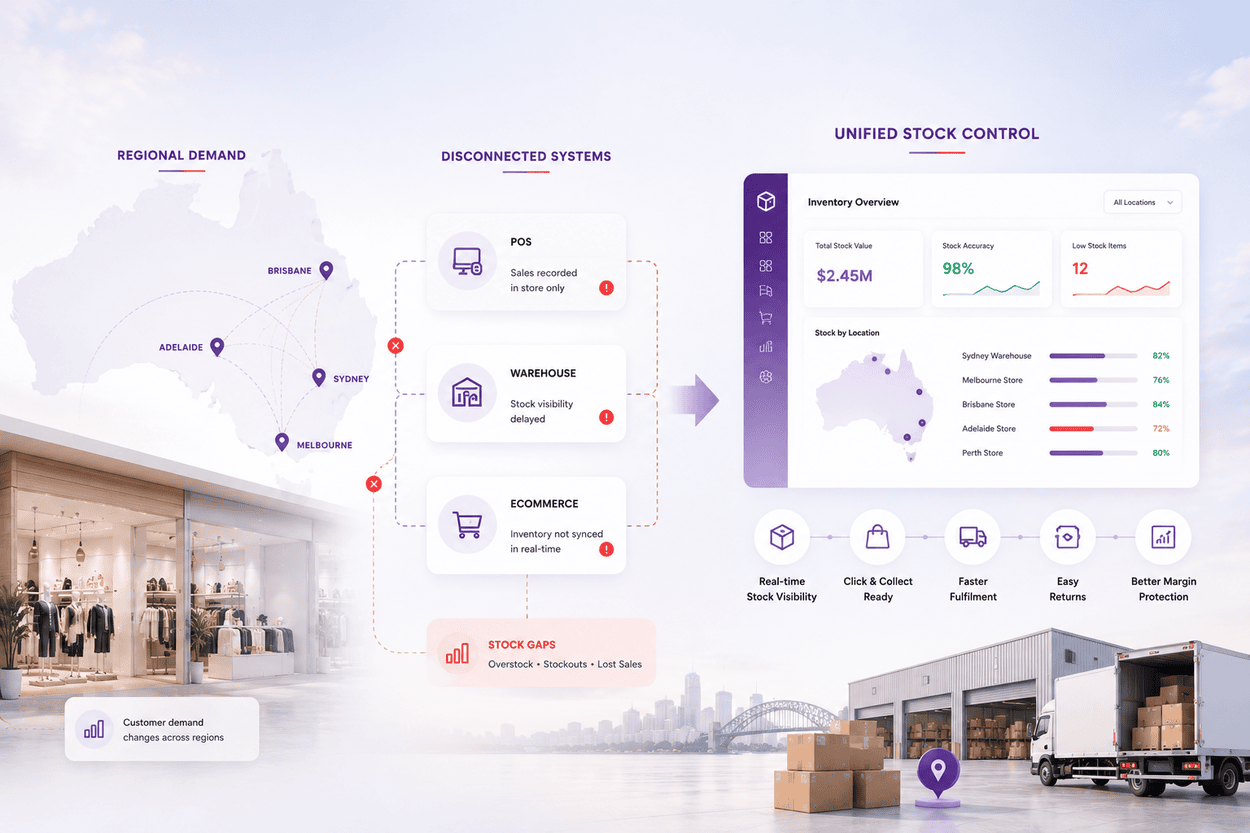
Retail in Australia has a special operating challenge. The geography is large. Cities are spread across long distances. Regional demand can change quickly. A product that sells fast in Brisbane may move slowly in Adelaide. A promotion in Sydney may affect warehouse picking in Melbourne.
Many retailers still handle this with spreadsheets, manual transfers, separate POS tools, and warehouse systems that do not speak clearly to ecommerce. That setup may work for a small operation. It starts to break once the business adds more stores, more SKUs, more suppliers, or faster online fulfilment.
Odoo retail ERP helps solve this by connecting store sales, ecommerce orders, warehouse movements, purchase orders, returns, and accounting. The main benefit is not just automation. The benefit is shared operational truth.
Moreover, ABS reported total online retailing sales of $4,703.8 million in June 2025, seasonally adjusted, with through-the-year online sales up 13.0 percent. That shift places more pressure on stock accuracy. Online customers expect availability to be correct. Store teams expect click-and-collect orders to be ready. Warehouse teams expect clean pick lists. Retail leaders expect the system to protect margin. Odoo warehouse management Australia gives retailers the foundation for this control.
Odoo WMS is not a separate warehouse product sitting away from the business. It works inside the Odoo ERP environment. For Australian retailers, this connected model is useful because warehouse decisions affect more than stock. They affect cash, customer delivery, store labour, supplier planning, and returns.
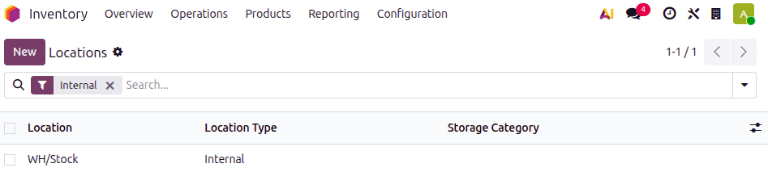
Odoo inventory management can manage warehouses, internal locations, routes, picking flows, stock moves, replenishment rules, barcode operations, serial numbers, lots, and cycle counts. Odoo documentation explains that storage locations can be created in a hierarchy, such as warehouse, zone, shelf, or bin. These locations can also be used with barcodes for warehouse actions.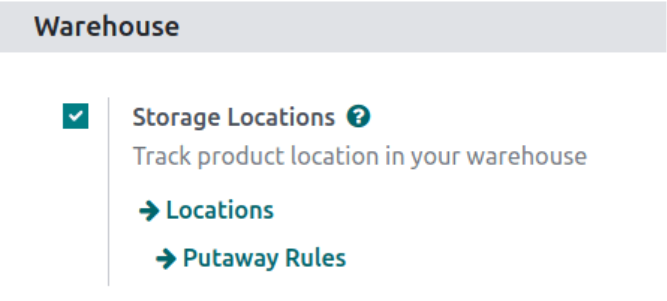
This makes Odoo WMS suitable for retailers that need more than basic stock on hand. It supports structured movement inside the warehouse. It also supports visibility across stores and fulfilment points.
Warehouse workflow architecture is the design of how stock moves through the business. This is where many ERP projects succeed or fail.
For a retailer, warehouse workflow architecture may look like this:
| Workflow Layer | What It Controls | Odoo Configuration Area | Retail Benefit |
|---|---|---|---|
| Receiving | Supplier goods coming into warehouse | Receipts, purchase orders, barcode scanning | Faster inbound checking |
| Quality check | Validation before stock becomes sellable | Internal transfer or quality location | Fewer wrong items in stores |
| Storage | Bin, shelf, zone, or bulk location | Warehouses and storage locations | Better picking discipline |
| Replenishment | Stock movement from warehouse to store | Reordering rules and transfer routes | Fewer store stockouts |
| Picking | Order-wise stock selection | Delivery orders and picking batches | Faster fulfilment |
| Packing | Dispatch preparation | Packing steps and carrier process | Fewer delivery errors |
| Returns | Customer or store returns | Return transfers and adjustment rules | Cleaner stock recovery |
| Cycle count | Periodic stock verification | Inventory adjustments by location | Better stock accuracy |
This architecture also helps teams define responsibility.
- The receiving team owns inbound accuracy.
- The warehouse team owns location discipline.
- The store team owns sales and returns accuracy.
- Management owns replenishment strategy.
Odoo replenishment can be configured through reordering rules, make to order routes, or master production schedule depending on the business process. Reordering rules can suggest or generate purchase orders when stock falls below minimum levels.
For retail, this is useful when products have predictable demand. Fast-moving SKUs can have minimum and maximum stock levels. Slow-moving products can be reviewed manually. Seasonal products can be planned through forecast-led replenishment.
See how we helped a business improve stock visibility, reduce carrying costs, and build a smarter inventory management system with AI, real-time tracking, and automated reorder planning.
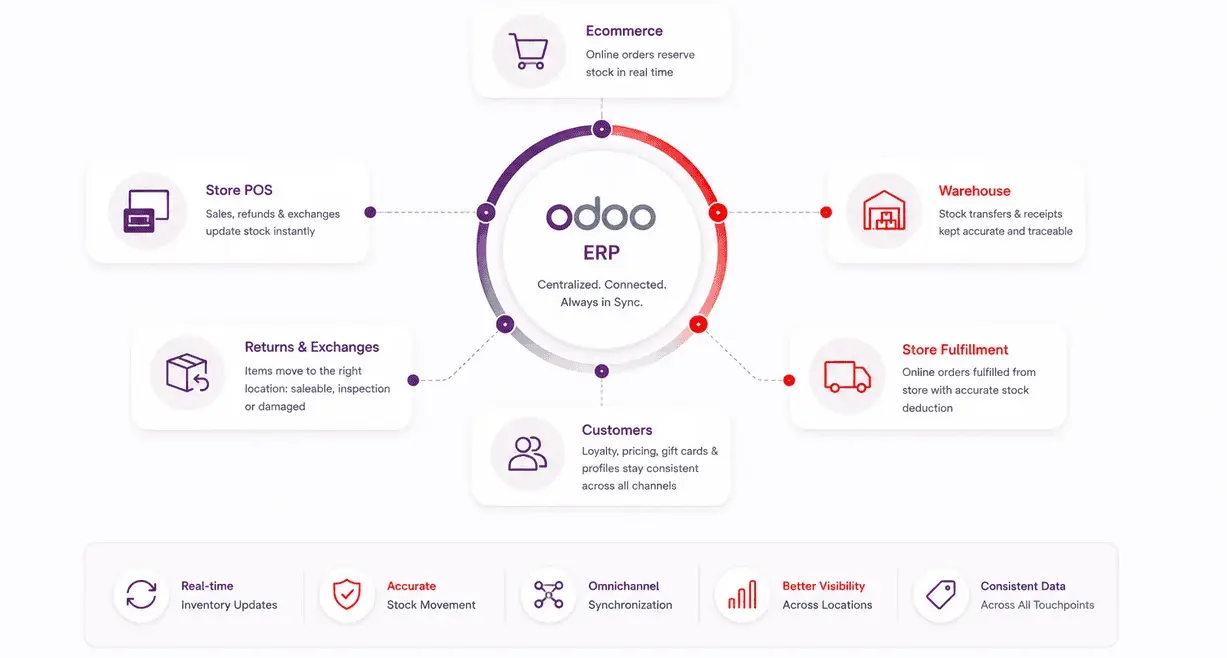
Store stock accuracy depends on POS discipline. Every sale, refund, exchange, and return must reflect correctly in inventory. Odoo POS is designed to work on devices with a browser. It can operate temporarily offline, register product moves in stock, provide real-time statistics, and consolidate data across shops.
Odoo POS and inventory synchronization can support several retail flows:
- A customer buys from a store. Stock reduces from that store location.
- A customer returns a product. Stock can move into saleable, inspection, or damaged location.
- A store fulfils an online order. Stock is reserved and reduced from that store.
- A product is transferred from warehouse to store. The transfer creates traceable movement.
- A cashier scans a barcode. The product, price, and stock record align with the system.
This synchronization helps reduce stock mismatch. It also gives leadership a better view of store-level availability.
For omnichannel retailers, POS data is especially important. Store sales must update ecommerce stock. Online orders must reserve stock before another channel sells it. Returns must be classified correctly. Gift cards, loyalty, pricing, and customer records must stay consistent. Odoo retail ERP can support this connected approach when the implementation is planned properly.
Multi-warehouse operations are common for Australian retailers that serve both metro and regional customers. Without proper stock rules, the system may send orders to the wrong warehouse. It may also create avoidable freight cost. It may show stock in one state while the customer expects fast local delivery.
Odoo warehouse management should include clear warehouse logic. The system should define where stock is stored, how it moves, and which location serves which demand.
Multi-warehouse design usually covers:
- Store warehouses for each retail outlet.
- Central warehouse for bulk stock.
- Regional warehouses for faster fulfilment.
- Transit locations for stock in movement.
- Vendor locations for incoming goods.
- Customer locations for delivered goods.
- Inventory loss locations for shrinkage and write-offs.
Odoo locations allow retailers to define internal, vendor, customer, transit, production, and inventory loss location types. This helps classify stock properly through each movement.
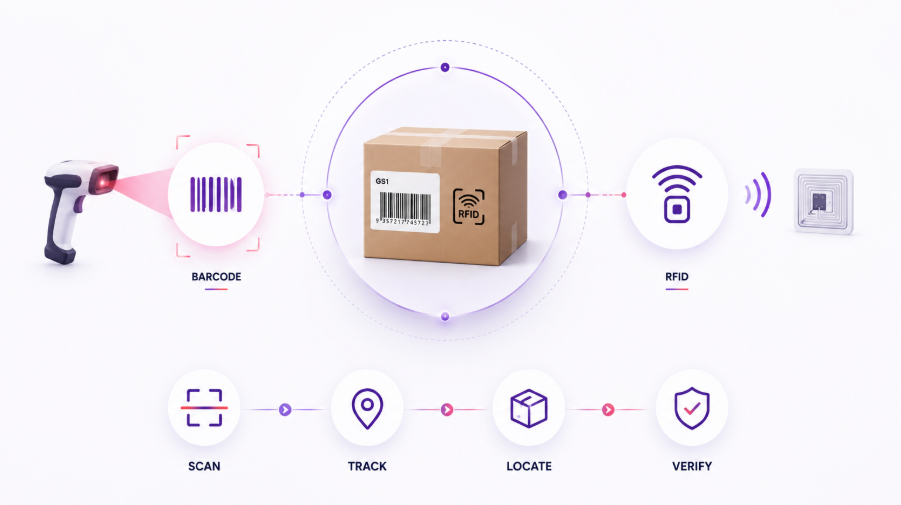
Manual stock entry creates errors. A tired team member can type the wrong SKU. A picker can select the wrong variant. A cashier can choose the wrong product from a list. Barcode automation reduces that risk. It also speeds up receiving, picking, packing, transfers, cycle counts, and POS billing.
- Odoo Barcode allows users to assign barcodes to products and product categories. It can also trigger inventory processes when a scanner is connected. A barcode inventory system is especially useful for retailers with high SKU volume. Fashion, electronics, homeware, hardware, grocery, and beauty retailers all benefit from scan-based control.
- GS1 standards are also important in Australia. GS1 Australia states that its barcodes have supported Australian retail since 1979. It also notes that they are endorsed by major Australian retailers and recommended for marketplaces such as Amazon and eBay. This matters because barcode design is not just an internal ERP decision. It affects supplier compliance, marketplace listings, retail handling, and checkout scanning.
- RFID can take automation further. GS1 Australia explains that RFID can identify, track, and trace every single product with a serialised number. It also improves supply chain visibility. RFID is useful when item-level traceability matters. Apparel, luxury, electronics, and high-shrink categories often consider it. It can improve cycle counts, stock search, store replenishment, and loss visibility.
- Retailers should also prepare for next generation barcodes. GS1 Australia says industry has defined a goal to enable next generation barcodes, along with existing barcodes, at retail POS globally by the end of 2027. This does not mean every retailer must change everything immediately. It does mean systems should be ready for richer product data, 2D codes, traceability, and connected retail use cases.
| Retail Operation | Barcode Use Case | RFID Use Case | Practical Impact |
|---|---|---|---|
| Goods receipt | Scan product and quantity | Bulk scan cartons or items | Faster inbound processing |
| Bin placement | Scan product and location | Detect item movement by zone | Better location accuracy |
| Picking | Scan SKU before picking | Locate item faster | Fewer wrong picks |
| Store replenishment | Scan transfer orders | Track serialised items | Cleaner inter-store movement |
| POS checkout | Scan product barcode | Possible item-level validation | Faster billing |
| Returns | Scan returned item | Trace item history | Better return classification |
| Cycle count | Scan shelf stock | Count items faster | Less manual counting |
| Loss control | Scan adjustments | Detect missing serialised items | Better shrink visibility |
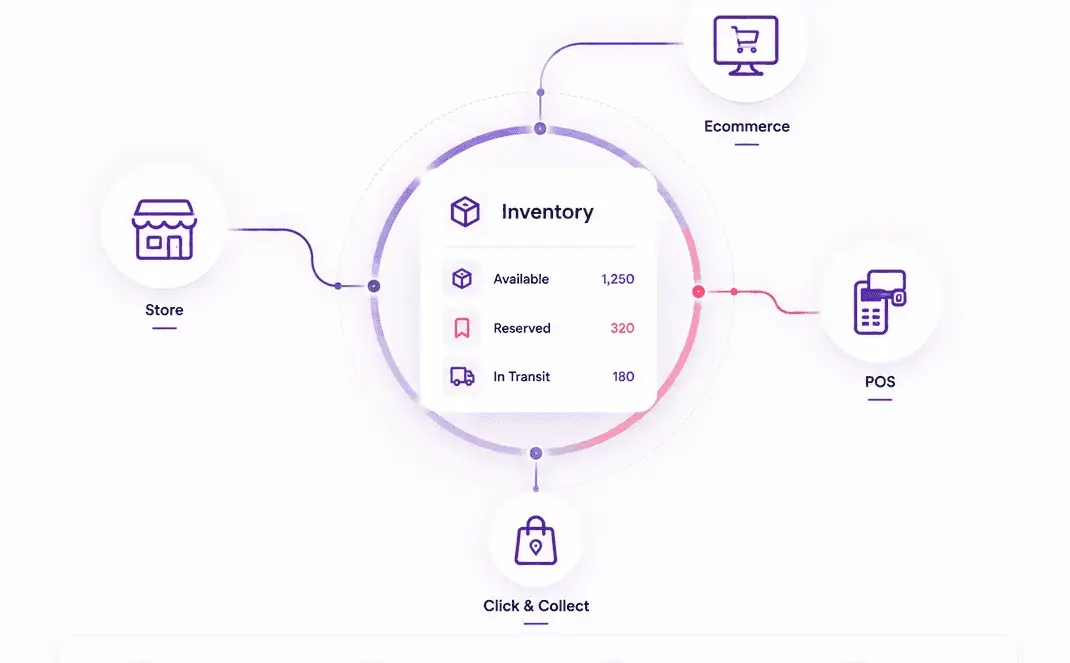
Australian retailers now sell across stores, websites, and click-and-collect channels. Customers expect stock, orders, returns, and loyalty points to stay updated everywhere. Omnichannel inventory management helps every channel work from the same stock data, so teams do not oversell, reserve the wrong items, or pick stock that has already moved.
Odoo inventory management can support omnichannel flows when products, warehouses, POS, ecommerce, and sales orders are connected within the same ERP.
- The key design choice is reservation logic. Retailers must define when stock becomes reserved. Is it at online checkout, payment confirmation, picking start, or packing completion. This decision affects customer promise dates and store availability.
- The second choice is fulfilment priority. Should the closest warehouse fulfil the order. Should stores be allowed to ship. Should high-margin orders receive priority. Should aging stock be cleared from selected locations.
- The third choice is return routing. A product returned in store may not be saleable immediately. It may need inspection, repacking, repair, or write-off. Odoo WMS should reflect these states through locations and rules.
Stock management software Australia should also support customer communication. If a product is unavailable, the team should know whether to suggest transfer, backorder, alternate product, or refund.
Retail leaders want clear ROI before investing in warehouse ERP Australia projects. With Odoo inventory automation software, ROI can come from faster receiving, fewer stockouts, better picking accuracy, lower excess stock, and reduced manual work. The best way to measure this is to track current performance before implementation, then compare improvements after Odoo WMS goes live.
Useful baseline metrics include:
- Inventory accuracy percentage
- Average receiving time per shipment
- Picking accuracy percentage
- Stockout frequency by SKU
- Order fulfilment time
- Return processing time
- Shrinkage value
- Excess stock value
- Manual reconciliation hours
- Supplier lead time variance
After Odoo WMS implementation, the same metrics should be tracked monthly. This gives leadership a practical view of impact.
| Problem Area | Odoo Capability | KPI to Track | Business Impact |
|---|---|---|---|
| Stock mismatch | Real-time stock moves | Inventory accuracy | Fewer lost sales |
| Slow receiving | Barcode-based receipts | Receiving time | Faster stock availability |
| Wrong picking | Scan validation | Picking accuracy | Fewer returns and complaints |
| Overstocking | Reordering rules | Excess stock value | Better cash flow |
| Stockouts | Min-max planning | Stockout rate | Higher sales availability |
| Manual transfers | Internal transfer workflow | Transfer closure time | Better store replenishment |
| Poor returns control | Return locations and rules | Return processing time | Cleaner resale decisions |
| Weak stock audit | Cycle counts by location | Adjustment frequency | Better shrink control |
| Limited visibility | Inventory dashboards | Stock ageing | Smarter buying decisions |
The ROI of Odoo warehouse management improves when automation is tied to process maturity. A retailer should not automate a broken flow. It should first simplify the flow, then configure Odoo, then train users, then measure adoption.
A retail Odoo WMS implementation should not begin with configuration screens. It should begin with business design.
- The first step is process discovery. Teams should walk through receiving, storage, picking, packing, dispatch, store replenishment, POS sales, returns, and stock adjustment. Each movement should be documented.
- The second step is master data cleanup. Product names, SKUs, barcodes, units of measure, variants, suppliers, costs, and tax settings must be corrected. Bad product data will weaken even the best warehouse setup.
- The third step is warehouse structure design. Retailers should decide how many warehouses, zones, shelves, bins, and virtual locations they need. This must match physical reality.
- The fourth step is route design. Inbound, outbound, internal transfer, returns, and replenishment routes should be simple enough for teams to follow.
- The fifth step is barcode planning. Scanners, labels, product packaging codes, location barcodes, and GS1 requirements should be tested before go-live.
- The sixth step is POS and ecommerce integration. Store sales, online orders, stock reservations, refunds, exchanges, and gift cards should be validated together.
- The seventh step is UAT. Retail teams should test real scenarios, not sample transactions. A good UAT includes damaged returns, partial deliveries, inter-store transfers, wrong barcode scans, refunds, split fulfilment, and supplier delays.
- The eighth step is training. Warehouse users need process training, not just screen training. Store teams need to understand how their POS actions affect stock.
- The ninth step is go-live support. Retail operations move fast. The first weeks need close monitoring, issue triage, and data correction support.
- The tenth step is continuous improvement. Once the base process is stable, retailers can add advanced reporting, automation, purchasing intelligence, and better demand planning.
Before starting an Odoo warehouse management Australia project, retailers should review the technical and operational checklist below.
- Product master data should be complete. Each SKU should have a clean name, category, barcode, cost, sales price, supplier, and unit of measure.
- Variant logic should be clear. Apparel retailers need size, colour, fit, and style controls. Electronics retailers may need serial numbers. Food retailers may need lots and expiry.
- Warehouse hierarchy should be practical. Too many bins can slow teams down. Too few locations can hide stock issues.
- POS flow should be tested with real store users. Refunds, exchanges, discounts, loyalty, and offline selling must be checked.
- Barcode scanners should be tested with Odoo before rollout. Device compatibility affects daily speed.
- Label printing should match product and shelf requirements. Poor labels can create repeated warehouse errors.
- Replenishment rules should start simple. Fast-moving products can use min-max logic. Seasonal products may need manual review.
- Inventory valuation should be aligned with finance. Accounting impact must be clear before go-live.
- Access rights should match user roles. Cashiers, warehouse staff, buyers, finance users, and managers need different controls.
- Reports should be designed around action. A report that does not drive a decision will rarely be used.
This checklist helps reduce ERP risk. It also keeps the project grounded in retail operations.
Many warehouse ERP Australia projects face the same avoidable problems.
- The first mistake is copying old processes into a new system. If the current process depends on informal messages, personal memory, or spreadsheet corrections, Odoo should not simply duplicate it.
- The second mistake is overcomplicating the warehouse structure. A retailer does not need hundreds of bin locations unless the team can maintain them daily.
- The third mistake is ignoring store users. POS users create many stock movements. Their training affects inventory accuracy as much as warehouse training.
- The fourth mistake is weak barcode planning. Barcodes must be tested across products, packaging, locations, scanners, POS, and returns.
- The fifth mistake is treating reports as an afterthought. Buying, replenishment, margin, ageing stock, and shrinkage reports should be part of the first design phase.
- The sixth mistake is setting automation without governance. Automatic replenishment can create excess stock if minimum and maximum quantities are not reviewed.
- The seventh mistake is skipping post-go-live monitoring. Stock systems need active review after real transactions begin.
Odoo inventory management works best when implementation is practical, phased, and measured.
Retail growth often creates operational strain. More stores mean more transfers. More online orders mean more reservations. More suppliers mean more inbound complexity. More SKUs mean more room for error.
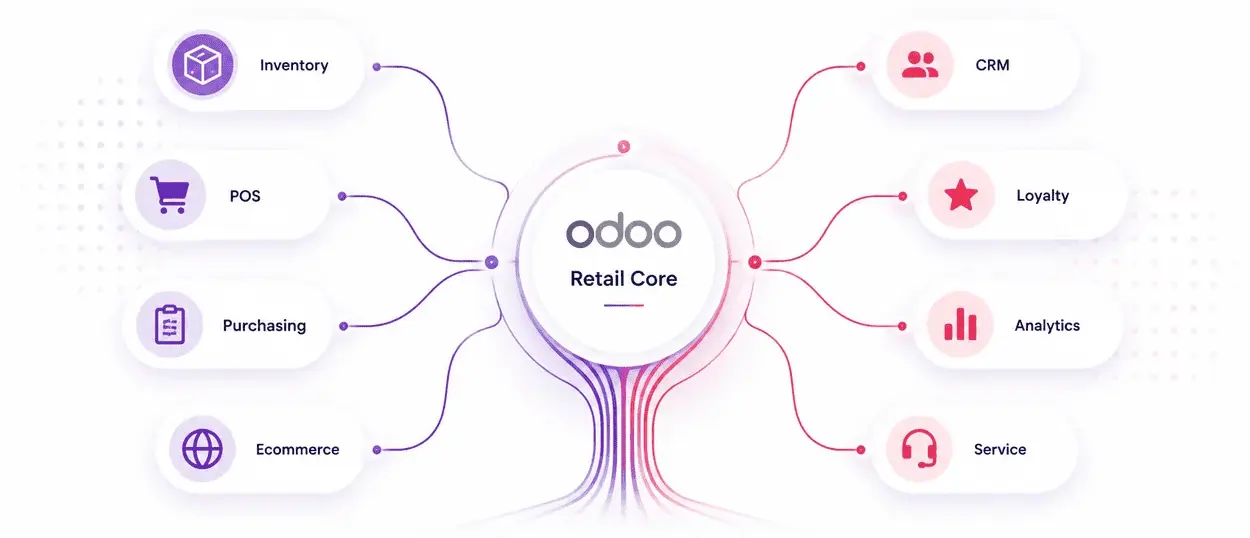
Odoo retail ERP can support this growth by keeping key functions connected. Inventory, POS, purchases, sales, ecommerce, accounting, CRM, and reporting can work from one business system. That connected structure is useful for retailers that want to expand without adding operational clutter.
A retailer can start with core inventory and POS. It can then add purchase automation, ecommerce integration, accounting, loyalty, CRM, advanced reporting, or field service depending on business needs. This staged approach works well for Australian retailers that want control without a heavy transformation shock.
Odoo warehouse management Australia should be planned with this future state in mind. The first phase should solve today’s pain. The architecture should still allow tomorrow’s scale.
Warehouse operations are moving from reactive processes to intelligent, data-driven systems. As AI capabilities continue to mature, retailers will gain greater control over inventory planning, replenishment, and warehouse efficiency.
Key Trends Shaping the Future
- AI-Powered Demand Forecasting
AI analyzes sales patterns, seasonal trends, promotions, and historical data to improve demand predictions and inventory planning. - Smarter RFID Adoption
RFID technology enables faster stock tracking, real-time inventory visibility, and more accurate warehouse audits with minimal manual effort. - Autonomous Replenishment
AI-driven replenishment engines can automatically trigger stock transfers and purchase orders based on demand forecasts and inventory thresholds. - Next-Generation Barcode Systems
Advanced barcode technologies support richer product data, faster scanning, improved traceability, and better warehouse intelligence. - Predictive Warehouse Optimization
AI can identify inventory bottlenecks, optimize storage allocation, and recommend operational improvements before issues affect fulfillment. - Intelligent Inventory Decisions
Future warehouse systems will move beyond tracking stock to continuously recommending actions that improve availability, reduce excess inventory, and support business growth.
Retailers do not need more stock reports. They need stock they can trust. Odoo warehouse management Australia gives retailers a way to connect warehouse movement, POS transactions, ecommerce orders, purchasing, replenishment, and reporting in one system. The value comes from better decisions, fewer manual corrections, faster fulfilment, and cleaner control across locations.
The strongest results come when Odoo WMS is designed around real retail operations. Warehouses, stores, suppliers, ecommerce, returns, and finance must be part of the same conversation. For Australian retailers, this is the practical path forward. Build inventory accuracy first. Add automation carefully. Measure the impact. Keep improving the system as the business grows.
The right Odoo implementation partner should understand more than modules. Retailers need a team that can read operations, ask practical questions, challenge weak processes, and configure Odoo around real business movement.
At iProgrammer, we help businesses that need ERP systems to support growth, reporting, automation, and operational control. For Australian retailers, that means designing Odoo around store operations, warehouse movement, POS activity, replenishment, and management visibility.
The work starts with a clear blueprint. It should define warehouses, locations, product masters, POS flows, barcode needs, replenishment rules, reporting needs, and integration points. It should also identify where standard Odoo is enough and where customization is genuinely needed. This protects budget and avoids unnecessary complexity.
As a certified Odoo partner in Australia, we can help you plan, implement, improve, and support Odoo inventory management with a practical delivery approach.
As a Content Strategist, I craft narratives that make technology feel approachable and purposeful. Whether it’s a new AI solution or a legacy service, I focus on creating content that’s clear, structured, and aligned with what matters to our readers.